

- New
 Beveiligingsbeleid
(bewerken met de module Klantenverzekering)
 Leveringsbeleid
(bewerken met de module Klantenverzekering)
 Retourbeleid
(bewerken met de module Klantenverzekering)
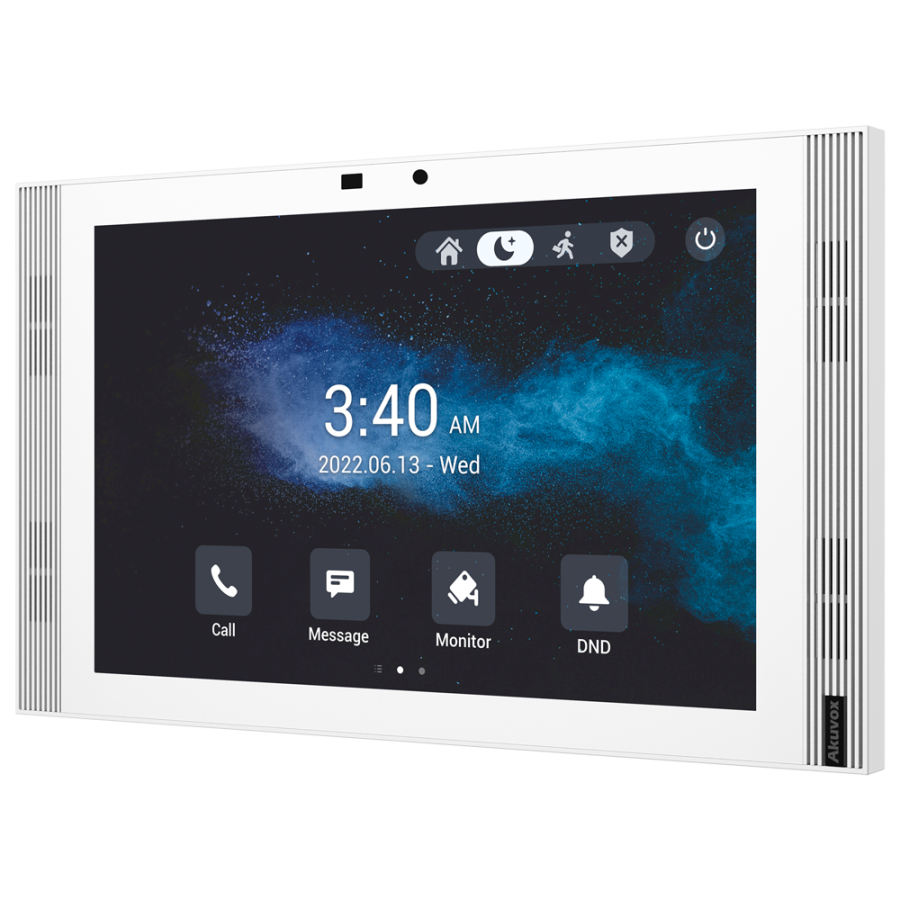
The video intercom is the element that is placed within the building, therefore it is also called an inner post, and which can receive calls from visitors to building staff.
This model has a 10 "touchscreen for easy operation, with IPS technology for better image quality. It also has an Android operating system, making it possible to install third-party applications with Google Services to include the burglary, operate SmartHome or CCTV system.
IP equipment communicates and is powered via Ethernet cables and PoE switches, which means that fewer cables are required for operation.
With 1 relay output it is possible to control different elements such as doors or buzzers that are activated during calls.
Advanced configurable functions: Integrated camera (makes video calls possible), OnVif protocol (makes it possible to add CCTV cameras directly to the monitor without additional apps), standard SIP protocol 2.0 (makes integration With PBXs from third parties possible) and doorbeling input (it makes it possible to connect the doorble knob directly to the monitor to act as a doorbell).
From the Akuvox Installer Cloud can be created the installation structure and add the devices on the basis of their MAC address. On this cloud-based platform you can update the firmware of the devices, change their local settings (such as network parameters, volume settings, relay parameters, etc.) or check their connection status, all remotely. In addition, computers can communicate with this system anywhere with each other, without having to open ports or use a VPN, thanks to the technology called Multisite.
With the Property Manager Cloud you can manage community and office projects created by installers to give references to users (keychains or PIN codes), viewing access logs or sending messages to users.
With the mobile application of SmartPlus, the end user can receive calls, open the door or view the camera from the panel, all from any location. Users can view a full conversation and access log, with screen shots, or set different access methods (PIN codes, NFC and / or Bluetooth access or face recognition). In addition, they can also create temporary access codes, called temporary keys to generate time-bound access to share with those who need it.